 gaming-horse.com
It's no surprise that Steam is the default shop on the Steam Deck — not only is it...
How To Earn PlayStation Points (And What To Use Them For)

From Starbucks Rewards for coffee lovers to Kindle Points for bibliophiles, there seems to be a loyalty program for just about everyone and everything. As one of the most popular names in gaming, it’s no surprise that PlayStation has found a way to give back to players who are loyal to the brand. Players who frequent the platform can earn Points through a program called PlayStation Stars. If that sounds like you, you can join the program for free on the official PlayStation website to get started. You’ll need to be a PlayStation Plus member to take advantage of everything this program has to offer, but there are lots of ways to earn Points, even if you’re not a member.
As with most rewards programs, spending money is the easiest way to earn Points and other rewards with PlayStation Stars. But it doesn’t end there; you can also complete campaigns to get Points or collectibles without forking over any cash. When you’ve accumulated enough Points, you can redeem them for things like digital collectibles and exclusive content.
How to earn PlayStation Points
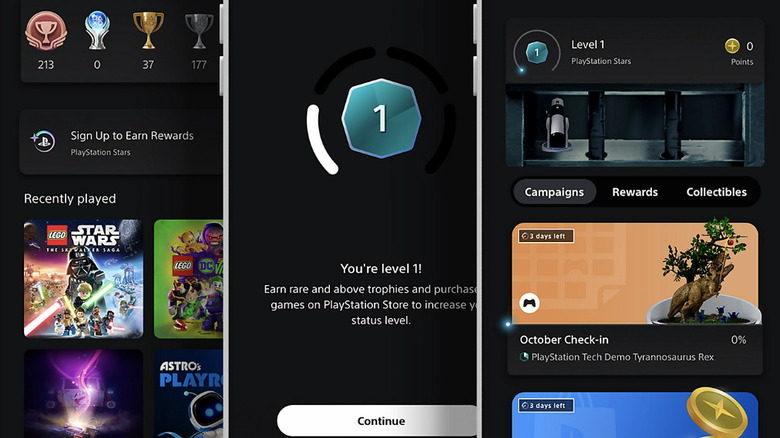
If you have a PlayStation Plus membership, you can accumulate Points by purchasing items in the PlayStation Store. Every time you buy something, you’ll earn Points that you can exchange for PlayStation Network wallet funds or save for the next time you want to buy something in the PS Store. Eligible purchases that earn Points include DLC, add-ons, and even new consoles, so if you have your eyes on the PlayStation 5 Pro, purchasing it will come with the added bonus of increasing your Points balance. Subscription payments for PlayStation Plus and other services are also eligible for Points, but only until March 1, 2025.
The other, arguably more fun (and free) way to earn Points is through completing different challenges and activities called Campaigns. PlayStation has all kinds of Campaigns; you might find yourself earning rewards by learning about PlayStation 5 Hidden features or competing in an online tournament. At other times, you’ll be prompted to participate in a customized Campaign inspired by the games you play. All you have to do is complete the objectives laid out for you, and you’ll receive a reward.
Additionally, PlayStation Stars has four levels. As you meet your objectives, like earning uncommon trophies or buying games from the PlayStation Store, you’ll level up and unlock new campaigns and rewards. You can find a list of the current campaigns on the PlayStation Stars hub on the PlayStation App.
What can you use PlayStation Points for?
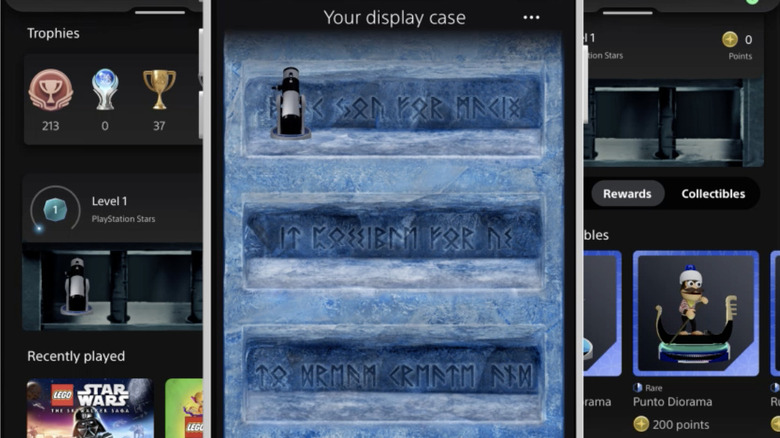
You can use the Points you earn to redeem items from your personal reward catalog, including digital games, add-ons, and in-game currency. Keep in mind that what’s available to you will change periodically. If you prefer, you can trade them in for PlayStation Network wallet credits that you can use toward your next PlayStation Store purchase.
Digital collectibles are another reward you can get from PlayStation Stars. While PlayStation doesn’t call these digital collectibles NFTs, the concept is similar. When you complete a campaign, you can earn rare or limited edition collectibles that you can display in a case on the PlayStation App. These collectibles don’t have any real-world monetary value, but they do feature iconic PlayStation characters and rare in-game items, making them a fun way to show off your achievements to your friends. Completing campaigns will allow you to unlock these collectibles.
Trophies are another item you can earn with PlayStation Stars. As you complete objectives and find collectibles, you’ll be awarded bronze, silver, gold, or platinum trophies for your hard work. Bronze trophies are the easiest to earn, while platinum trophies are the hardest. A trophy also has a rarity level based on how many players have earned them, ranging from common to ultra rare. The more rare trophies you earn, the higher your PlayStation Stars status will be, with level one being the lowest and level four being the highest.
Source: http://www.slashgear.com/1676276/playstation-points-earn-use/
You may also like

